A BIOS password is a protection measure that can be used to stop someone powering up a computer system or making changes in some of the computers most sensitive areas. Many big name computer manufacturers such as Dell and HP lock the customers out of this area because they don’t want the customer changing anything and potentially damaging the machine (which the manufacturer may have to warranty). However, when someone like a computer technician or hardware enthusiast needs to make some hardware changes to the computer, they will need to access the BIOS. Here are some methods to be a bios password cracker, removing a BIOS password.
Showing posts with label Windows 7. Show all posts
Showing posts with label Windows 7. Show all posts
July 27, 2015
July 26, 2015
How to Find Your Wireless Network (WiFi) Password in Windows 7
Do you need to give your wireless password to a friend or guest, but can't remember it? Are you locked out of your own network because your computer decided to forget the password? If you need to retrieve your wireless password, you have a couple of different options, or you can reset your router and start from scratch. This trick is very simple you don’t need any type of software or tools for knowing saved wifi password in windows 7.
Click Here If You Are Using Windows 8 or 8.1
Click Here If You Are Using Windows 8 or 8.1
July 23, 2015
How to Make Bootable USB (Pen Drive) Using Windows 7
To create a bootable USB drive manually, we will use the Command Prompt as a Windows default program. Here are step by step to create a bootable USB drive as the Windows installation media. To create a bootable USB drive as a Windows installation media, we require at least 4 GB for minimum capacity. Larger capacity is better. At this moment, I use the USB flash drive with 2 GB of capacity as just an example. It's due to some reasons that my 4 GB flash drive encountered an unusual problem that i have to fix later.
Click Here For Windows 8 User
July 22, 2015
How to Make Your Windows 7 Run Faster and Faster
How to make Windows 7 faster and faster? Here are some easy and free steps to make windows 7 faster and faster. I combined these methods from my experience and experiments which worked much better in improving windows 7 performance. These following steps can be done by any Windows 7 user and not required third party or paid software and extra technical knowledge.
July 20, 2015
How to Make Windows 7 Genuine Using CMD (Command Prompt)
Have You Ever thought of Making Windows 7 Genuine Using Command Prompt Directly Without Using any Activation Crack or Loader ? – So Today Here in this Post I am Going to Tell you a very Simple Procedure to Make Your Windows 7 Genuine Using Command Prompt.Because of the High Cost of Original Windows 7 Not Everyone Can afford to buy Original Microsoft Windows 7 So they Prefer to Use Cracked or Pirated Versions of Windows.
July 17, 2015
Free Download Kaspersky Internet Security 2015 Full Crack Version

Kaspersky Internet Security is security software for Internet security that protects the most effective and complete protection of a computer from all sorts of electronic threats - malicious programs, hacker attacks and spam. It is published by Kaspersky Lab, to use this software; you should have at least one of the operating system of Windows Vista, Windows 7, and Windows XP. The key features of Kaspersky Internet Security are the following: Complete PC Protection, Kaspersky Urgent Detection System, Kaspersky Security Analyzer, Kaspersky iSwift and iChecker Scanning, Automated Hourly Updating, Kaspersky Virtual Keyboard, Kaspersky Security Network, Kaspersky Whitelisting and Application Control, Kaspersky Anti-Spam and Two-Way Firewall and Parental Controls.
February 11, 2015
How to Reduce Video Size
1. Open Windows Movie Maker. Movie Maker is an application included with Windows for editing and creating videos. It provides a simple way to reduce the file size of any video file.
2. Import your video file into Movie Maker. In the left panel (entitled "Movie Tasks"), look under the "Capture Video" heading for an option that reads, "Import video." Click on this option, and then navigate to the location on your hard drive where the video file is stored. Double-click on the file to open it into Movie Maker.
2. Import your video file into Movie Maker. In the left panel (entitled "Movie Tasks"), look under the "Capture Video" heading for an option that reads, "Import video." Click on this option, and then navigate to the location on your hard drive where the video file is stored. Double-click on the file to open it into Movie Maker.
February 1, 2015
Top 10 Programming Languages 2015

1. Java:
Java is a class-based, object-oriented programming language developed by Sun Microsystems in the 1990s. It's one of the most in-demand programming languages, a standard for enterprise software, web-based content, games and mobile apps, as well as the Android operating system. Java is designed to work across multiple software platforms, meaning a program written on Mac OS X, for example, could also run on Windows.
January 29, 2015
How to Delete/Remove Shortcut Virus on Windows
Go to CMD and type in the commands.
For example, the virus is located in "F" drive, then just type attrib-h-r-s / s / df: \ *. *. The F beside the D is your drive; simply change it to where drive the virus is located.
and Press Enter
For example, the virus is located in "F" drive, then just type attrib-h-r-s / s / df: \ *. *. The F beside the D is your drive; simply change it to where drive the virus is located.
and Press Enter
January 21, 2015
Top Best Free Windows Screen Recorder Software
1. TinyTake:
TinyTake is a free screen capture & video recording software for Microsoft Windows. With TinyTake, you can capture images and videos of your computer screen, add comments and share them with others in minutes. TinyTake is built by MangoApps and is available for free.
TinyTake is a free screen capture & video recording software for Microsoft Windows. With TinyTake, you can capture images and videos of your computer screen, add comments and share them with others in minutes. TinyTake is built by MangoApps and is available for free.
January 1, 2015
How do I fix network adapter problems in windows 7?
If you can't connect to a network, there might be a problem with your network adapter. First, try using the Network Adapter troubleshooter to automatically find and fix some common problems:
Open the Network Adapter troubleshooter by clicking the Start button Picture of the Start button, and then clicking Control Panel. In the search box, type troubleshooter, and then click Troubleshooting. Click View all, and then click Network Adapter.
Open the Network Adapter troubleshooter by clicking the Start button Picture of the Start button, and then clicking Control Panel. In the search box, type troubleshooter, and then click Troubleshooting. Click View all, and then click Network Adapter.

August 15, 2014
Top 20 Useful Windows 7 Shortcuts Keys
Managing windows is probably one of the most fertile areas for keyboard shortcuts because otherwise, you manipulate them solely with the mouse. Here’s my top-20 list of must-know shortcuts for taming your windows; you’ll never have to move your hands from the keyboard.

August 4, 2014
How to Update Offline Procedure for Kaspersky 2015
1. After Installation & Activation, inside the Kaspersky DVD,
find “Kaspersky Offline Update …[date]…” folder and Copy it to C:\ drive of your computer

find “Kaspersky Offline Update …[date]…” folder and Copy it to C:\ drive of your computer
July 22, 2014
How To Install Windows 7 Step-By-Step
Turn on your computer, insert the Windows 7 installation disc or USB flash drive, and then Shut down your computer.
Restart your computer.
Press any key( eg: F1, esc ) when prompted, and then follow below steps.
Restart your computer.
Press any key( eg: F1, esc ) when prompted, and then follow below steps.
July 21, 2014
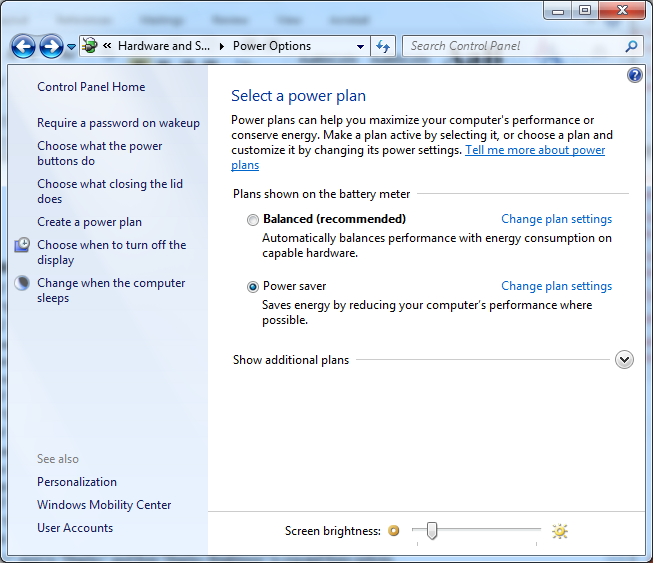
How to Adjust/Change Screen Brightness in Windows
Click "Start >> Control Panel >>Hardware and Sound >>Power Options" to open the Power Options window.
OR
Right Click >> Personalization >>Display on the bottom of left side >>Click Adjust Brightness
Subscribe to:
Posts (Atom)
Earn Money From Home
